-
Shop
- Adidas
- Advanced Technologies
- Auto
- Back to School
- Best-Sellers
- Car Accessories
- Dating & Social Skills
- Education & Learning
- Family & Parenting
- Fashion
- Alexander McQueen
- Balenciaga
- Belts
- Blazers
- Bottega Veneta
- Brunello Cucinelli
- Burberry
- Chanel
- Chloé
- Dior
- Dolce & Gabbana
- Etro
- Fendi
- Gucci
- Hoodies & Sweatshirts
- Jacquemus
- Jil Sander
- Jimmy Choo
- Kiton
- Luggage
- Miu Miu
- Off-White
- Outerwear
- Prada
- Rick Owens
- Saint Laurent
- Sweaters & Cardigans
- The Row
- Tom Ford
- Tops & Shirts
- Umbrellas
- Valentino
- Valentino Garavani
- Versace
- Vivienne Westwood
- Fashion Accessories
- Gadgets
- Gifts
- Health & Beauty
- Health & Wellness
- Home & Garden
- Home Supplies
- Kids & Babies
- Kitchen
- Nike
- Outdoor Fun
- Patio, Lawn & Garden
- Personal Growth
- Pet Care
- Pet Supplies
- Pets
- Sport & Outdoors
- Summer 2025 Fashion Collection
- Summer Fashion
- Summer Food & Drinks
- Super Deals
- Travel
- Travel Gear
- Wealth
Mini Bluetooth 5.0 Speaker: 3D Stereo, FM, HiFi Tips

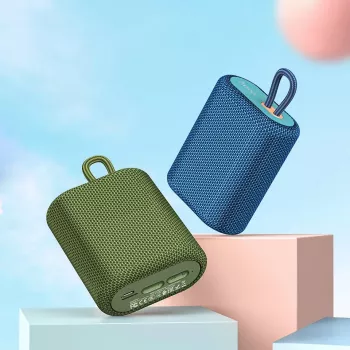
Portable Mini Bluetooth 5.0 Speaker with 3D Stereo, FM, and HiFi Sound: Small Size, Bigger Listening
A compact speaker can be the difference between quiet background audio and a room-filling playlist—especially when it adds wireless convenience, wider stereo effects, and the option to tune into local radio. A portable mini Bluetooth 5.0 speaker with 3D stereo, FM capability, and clear HiFi-style playback fits into daily life easily: quick music at your desk, a podcast while cooking, or a little extra volume outdoors without hauling bulky gear.
Below is a practical breakdown of what makes these speakers sound “bigger,” how to get dependable Bluetooth playback, when FM radio actually comes in handy, and simple habits that keep a small speaker performing well over time.
What makes a mini speaker feel bigger than it looks
Mini speakers don’t have the cabinet volume or multiple large drivers that bigger systems use, so the “wow” factor often comes from smart tuning and placement rather than raw power.
- 3D stereo effects can widen the soundstage so vocals and instruments feel less boxed-in compared with basic single-driver playback. You’ll often notice this most with live recordings, acoustic tracks, and songs with hard-panned instruments.
- Bluetooth 5.0 typically improves connection stability and efficiency versus older versions, which can help reduce dropouts in busy environments where many devices compete for space.
- Balanced tuning matters more than max bass in a small enclosure. Clear mids keep voices and podcasts intelligible, while controlled bass avoids the “flabby” sound that shows up when volume goes high.
- Placement is a free upgrade: setting the speaker near a wall or on a firm surface can reinforce perceived bass and loudness. Soft surfaces (beds, couches) tend to absorb energy and make sound feel thinner.
For a quick test, play a familiar track at moderate volume, then move the speaker from a soft surface to a countertop or shelf. Many mini speakers immediately sound fuller and more stable.
Wireless playback: pairing, range, and everyday reliability
Bluetooth is meant to feel effortless, but small changes in setup can make the difference between smooth playback and constant interruptions.
- Pairing is usually fastest when the speaker is put into pairing mode first, then selected from your phone’s Bluetooth device list.
- For the most reliable connection, keep line-of-sight when possible and avoid blocking the signal with metal surfaces or dense objects (like stuffing your phone in a bag next to keys).
- If audio stutters, reduce distance, pause other wireless-heavy tasks, or forget and re-pair the device to refresh the connection.
- Set volume intelligently: keep the source device volume fairly high and fine-tune on the speaker (or vice versa) to minimize hiss and avoid clipping at max levels.
Quick checks for smoother Bluetooth audio
| Situation | Likely cause | Fast fix |
|---|---|---|
| Audio cuts in and out | Interference or distance | Move closer; avoid placing the phone behind metal or inside a bag |
| Won’t pair | Old pairing record or wrong mode | Forget device on phone; re-enter pairing mode; restart both devices |
| Low volume | Source volume capped | Raise phone volume; check media volume and any app volume limits |
| Distortion at high volume | Driver overdrive or boosted bass | Lower volume slightly; reduce EQ bass boost; reposition on a stable surface |
For more background on how Bluetooth versions and features are standardized, the official Bluetooth Core Specification is the primary reference.
FM radio on a portable speaker: when it’s useful
If you want a simple overview of how FM works and what can affect it, NPR’s primer on FM radio is a helpful read.
HiFi-style sound in a small form: what to listen for
In dense wireless environments, interference can also masquerade as “bad sound.” The FCC’s consumer guide on interference and wireless devices explains common sources and practical mitigation.
Best uses: travel, desk setups, kitchen listening, and outdoor hangouts
If you’re setting up a small listening corner, pairing a compact audio setup with simple décor can make the space feel more finished—an Elegant Irregular Oval Shaped Tabletop Mirror for Home Décor works nicely on a desk or dresser, while a Handmade Glazed Ceramic Flower Pot can add a clean, minimal touch near a window where FM reception is often better.
Care, charging habits, and simple longevity tips
A compact option to consider
If you want a simple, portable speaker that covers the essentials—wireless playback, enhanced stereo feel, and radio—this model is a straightforward pick: Portable Mini Bluetooth 5.0 Speaker with 3D Stereo, FM, and HiFi Sound. It’s well-suited for casual daily listening, including background music, podcasts, and on-the-go playback with an easy-to-place footprint.
At-a-glance overview
| Item | Details |
|---|---|
| Product | Portable Mini Bluetooth 5.0 Speaker with 3D Stereo, FM, and HiFi Sound |
| Price | 31.97 USD |
| Availability | In stock |
FAQ
How do 3D stereo effects work on a small Bluetooth speaker?
Many compact speakers use digital signal processing to widen the perceived stereo space by shaping phase and frequency cues. Results depend on placement and the recording, and it won’t replace true separation from two speakers, but it can sound broader than standard mono playback.
Why does the FM radio sound noisy or fail to find stations?
FM reception is heavily affected by building materials, distance to broadcast towers, and nearby electronics. Try moving closer to a window or outdoors, rescanning in a stronger-signal spot, and keeping the speaker away from other devices that may introduce interference.
What’s the best way to reduce Bluetooth dropouts?
Keep the phone closer to the speaker, avoid obstacles (especially metal), and reduce local wireless congestion when possible. If problems persist, restart both devices, “forget” the pairing and reconnect, and make sure your phone’s operating system is up to date.
Recommended for you

Was this article helpful?
Yes
No









Leave a comment